How to schedule a thread on X
X will schedule a single post for you, but not a thread. If you want a thread to go out at 9 tomorrow morning, something else has to post the opener and then each reply under it. Here's how to do that with PostJr, and how to space the replies out so they don't all land at once.
Why X can't do it on its own
X's scheduler works one post at a time. Once a second post joins the composer, you can only post the thread live, so you end up awake at 9 a.m. to press the button.
PostJr sends the thread from its own servers at the time you pick. The opener goes out first, and each reply is posted under the one before it. Your laptop can be closed the whole time.
Write the thread
Start a new post and choose your X account under To. Write the opener in the first card. It's the post people see in their feed, so the hook goes here.
Click Add reply for each next post. Every reply gets its own card, named Reply 1, Reply 2 and so on, with its own text, images or video. If you drop a file on a card, it goes into that reply.
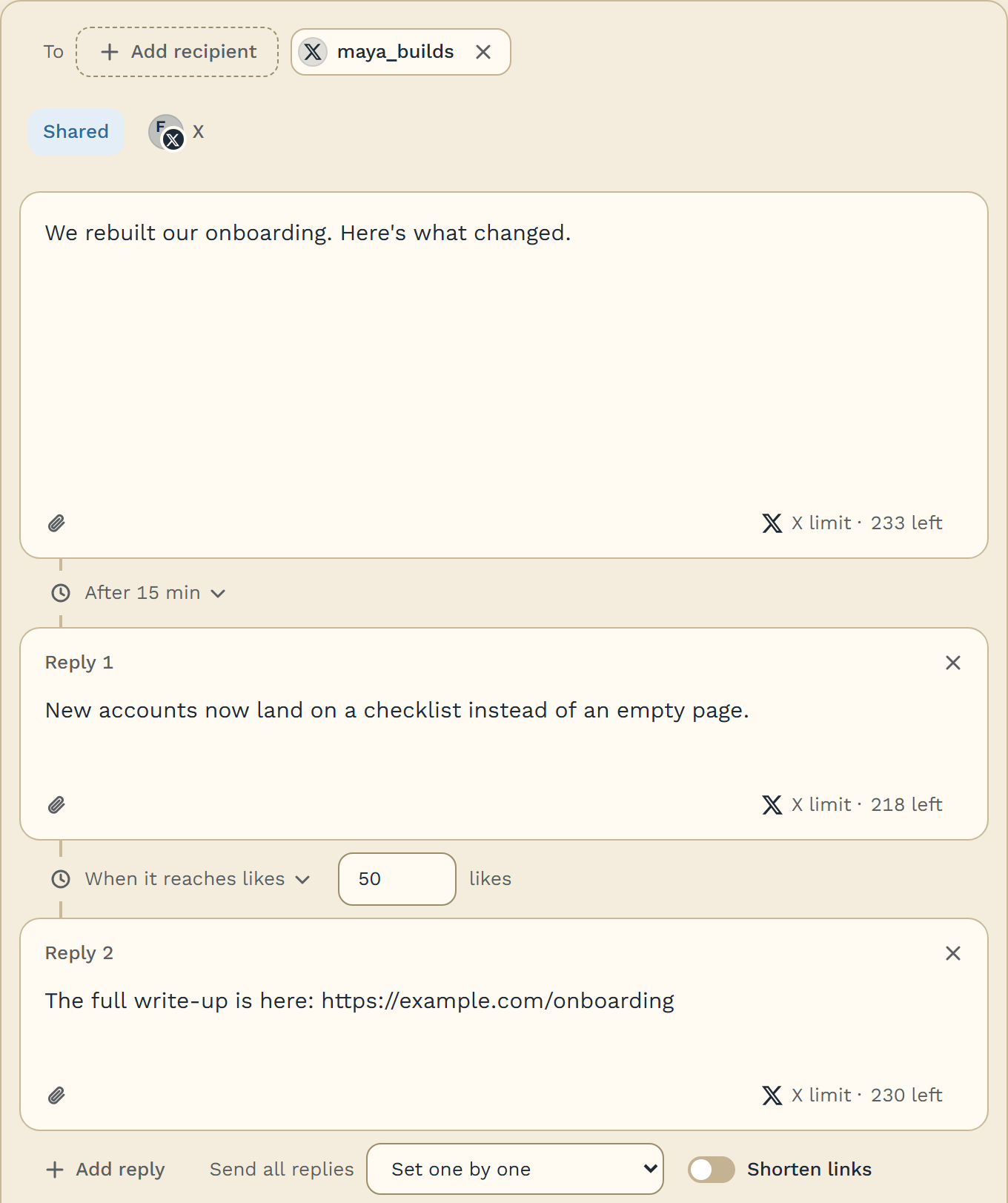
Each card counts its own characters the way X does, so a link always counts as 23. X allows 280 characters a post and up to 4 images or one video. If a reply runs long, its card tells you before you schedule anything.
Space out the replies
The replies don't have to land at once. The line joining two cards says when the next post goes. Click it and choose:
- Right away for a normal thread.
- A wait, like After 15 min or After 1 h, or Custom to type your own. People get time to read the opener before the follow-up shows up.
- When it reaches likes, then type how many, or When it gets comments. The reply only goes out once the opener has earned it, which makes it a good place for a link or an offer.

If the opener never reaches the number, PostJr stops waiting after 7 days. The post then shows as published with a note that it didn't reach the count, so it doesn't sit on your calendar forever. There's more about this in replying after likes.
Pick when it goes out
Until you choose a time, the button at the bottom right says Post now. To its left are quick times like In 1 hour, Tomorrow 9:00 and Next Monday 9:00, plus Pick a time… for anything else. Choosing a time doesn't send anything. The button changes to Schedule · Tomorrow 09:00 with your time zone, and the thread goes out at that time only after you click it.

From then on the thread sits on your calendar as Scheduled. You can drag it to another time until it goes out.
A thread can have up to 25 posts, the opener and 24 replies. Each reply counts as a post, and PostJr sends at most 50 posts a day from one X account.
Send it to Bluesky and Mastodon too
Add more accounts under To and the same thread goes to each of them. Every network gets its own tab, so you can change the wording for one without touching the others, and each card counts characters by that network's rules. PostJr sends threads to X, Bluesky, Mastodon, Discord, Slack.
Schedule it from code or an agent
If you'd rather script it, send the opener as body and the replies as thread. Each reply can carry delayMinutes, minLikes or minReplies:
{
  "body": "We rebuilt our onboarding. Here's what changed.",
  "schedule": { "channelIds": ["<your X account id>"], "at": "2026-12-01T09:00:00Z" },
  "thread": [
    { "body": "New accounts now land on a checklist instead of an empty page.", "delayMinutes": 30 },
    { "body": "The full write-up is here: https://example.com/onboarding", "minLikes": 50 }
  ]
}
Or ask an agent connected to PostJr: Schedule this thread on my X account for tomorrow at 9. Send the first reply 30 minutes later and the second once the first post has 50 likes.
Setup is on the AI agents page, and every field is in the API reference.
$0 today. 7 days free, card required, then from $29 a month. Three plans, by how many accounts you connect.
Questions
Can X schedule a thread by itself?
No. X's scheduler handles one post at a time, so a thread has to go out live unless another tool sends it for you.
How long can a scheduled thread be?
Up to 25 posts: the opener and 24 replies. Each reply counts as one post toward the 50 posts a day PostJr sends from one X account.
Can a reply wait until the first post does well?
Yes. Set the reply to go when the first post reaches a number of likes or replies. If it never gets there, PostJr stops waiting after 7 days and the post shows as published with a note.
Can the same thread go to Bluesky and Mastodon?
Yes. Add those accounts under To and each network gets its own tab, so you can change the wording for each one before it goes out.